Support Portal Software for Small Teams

Create a support portal that stays connected to product work

Publish help docs, collect private customer requests, and keep support follow-up connected to internal product tasks.

Public help docsTicket intakeLinked tasksReusable answers
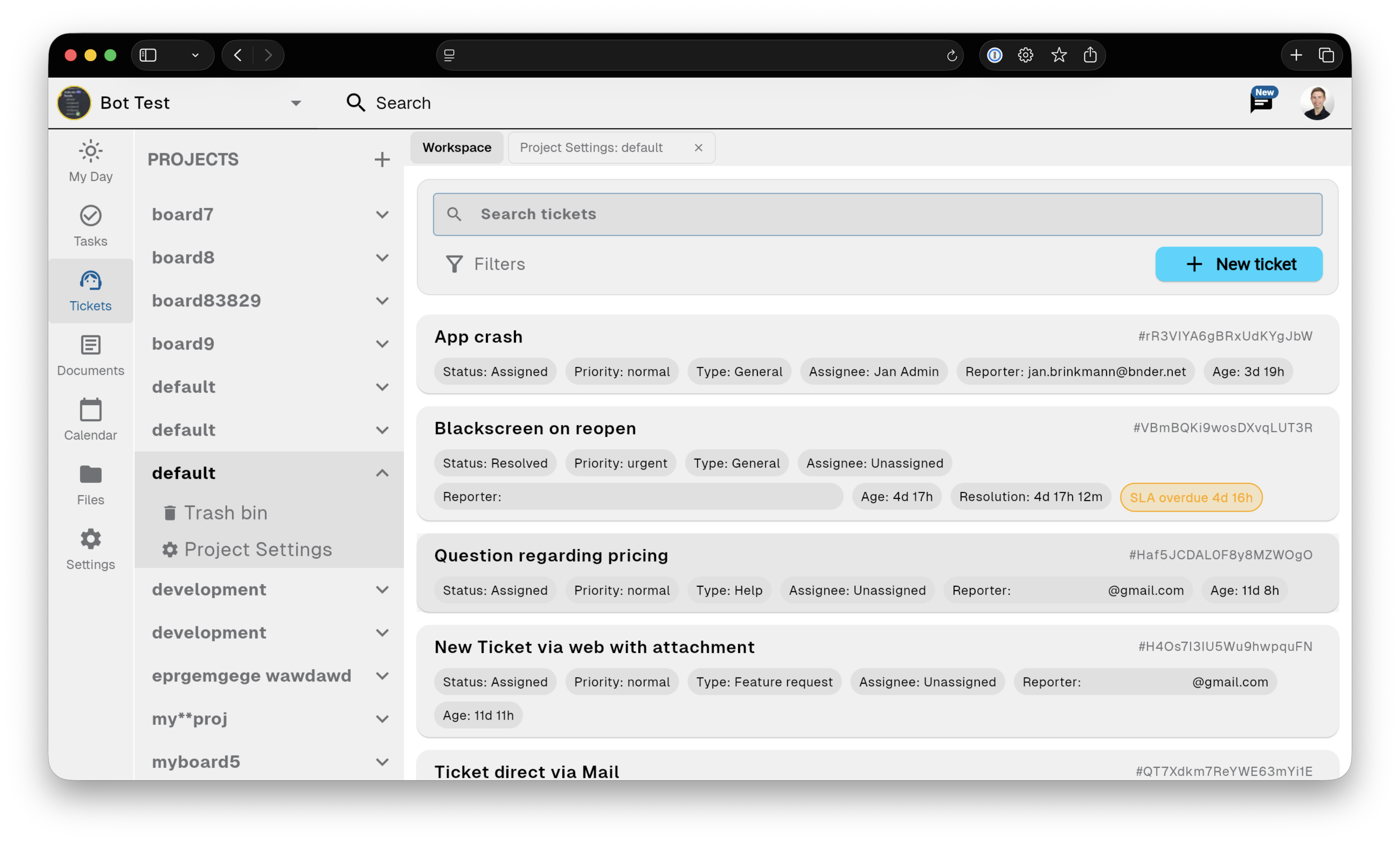
Bnder ticket workflow screenshot

Support portal

Public help documentation and private customer requests

Publish help docs, collect private customer requests, and keep support follow-up connected to internal product tasks.

Help docs

Turn solved issues into internal or public documentation so the next answer is already written.

Ticket form

Receive requests from email, public forms, and the app.

Support tickets

Reply from the connected workflow when the product work is resolved.

Linked tasks

Keep the original customer, conversation, and reason attached.

Custom page domains

Free is enough to start with a basic portal and internal workflow. Starter removes growing-team limits. Pro adds email routing, external replies, connected support mailboxes, SLA policies, advanced support workflows, and custom page domains.

Email

Turn support emails into tracked tickets, reply from Bnder, and keep each customer request connected to product tasks and help documentation.

Linked product task

Linked product task

Keep the original customer, conversation, and reason attached.

  • Keep the original customer, conversation, and reason attached.
  • Linked tasks carry customer context into delivery.
  • Resolved issues become reusable help documentation.

Knowledge base

Knowledge base

Turn solved issues into internal or public documentation so the next answer is already written.

Internal notes

Keep private context for workspace members without exposing it on the public portal.

Public articles

Turn solved issues into internal or public documentation so the next answer is already written.

Ticket context

Linked tasks carry customer context into delivery.

Ticket intake

Email or form

Receive requests from email, public forms, and the app.

Public form

Receive requests from email, public forms, and the app.

Email

Turn support emails into tracked tickets, reply from Bnder, and keep each customer request connected to product tasks and help documentation.

Support portal

Publish help docs, collect private customer requests, and keep support follow-up connected to internal product tasks.

Discord

Collect support requests from your Discord community, coordinate follow-up in Bnder, and turn repeated answers into public knowledge.

App tickets

Receive requests from email, public forms, and the app.

See how it works

Replace the gap between your support inbox and your task tracker

The original conversation stays attached to the ticket, a linked task carries context into delivery, and solved issues become reusable help content.

  • Customer requests stay connected to the conversation.
  • Linked tasks carry customer context into delivery.
  • Resolved issues become reusable help documentation.

Pricing

Free is enough for a simple portal and internal workflow.

Free is enough to start with a basic portal and internal workflow. Starter removes growing-team limits. Pro adds email routing, external replies, connected support mailboxes, SLA policies, advanced support workflows, and custom page domains.

Frequently asked questions

What is Support Portal Software for Small Teams?

Publish help docs, collect private customer requests, and keep support follow-up connected to internal product tasks.

Can I use an existing support email address?

Turn support emails into tracked tickets, reply from Bnder, and keep each customer request connected to product tasks and help documentation.

Can customers submit requests without joining the workspace?

Publish help docs, collect private customer requests, and keep support follow-up connected to internal product tasks.

Can support requests become linked product tasks?

Keep the original customer, conversation, and reason attached.

Who is Bnder designed for?

A focused workflow for SaaS startups, plugins, extensions, devtools, AI products, and other small software teams.

Where can I compare the available plans?

Free is enough to start with a basic portal and internal workflow. Starter removes growing-team limits. Pro adds email routing, external replies, connected support mailboxes, SLA policies, advanced support workflows, and custom page domains.

Create a support portal that stays connected to product work